
.jpeg)
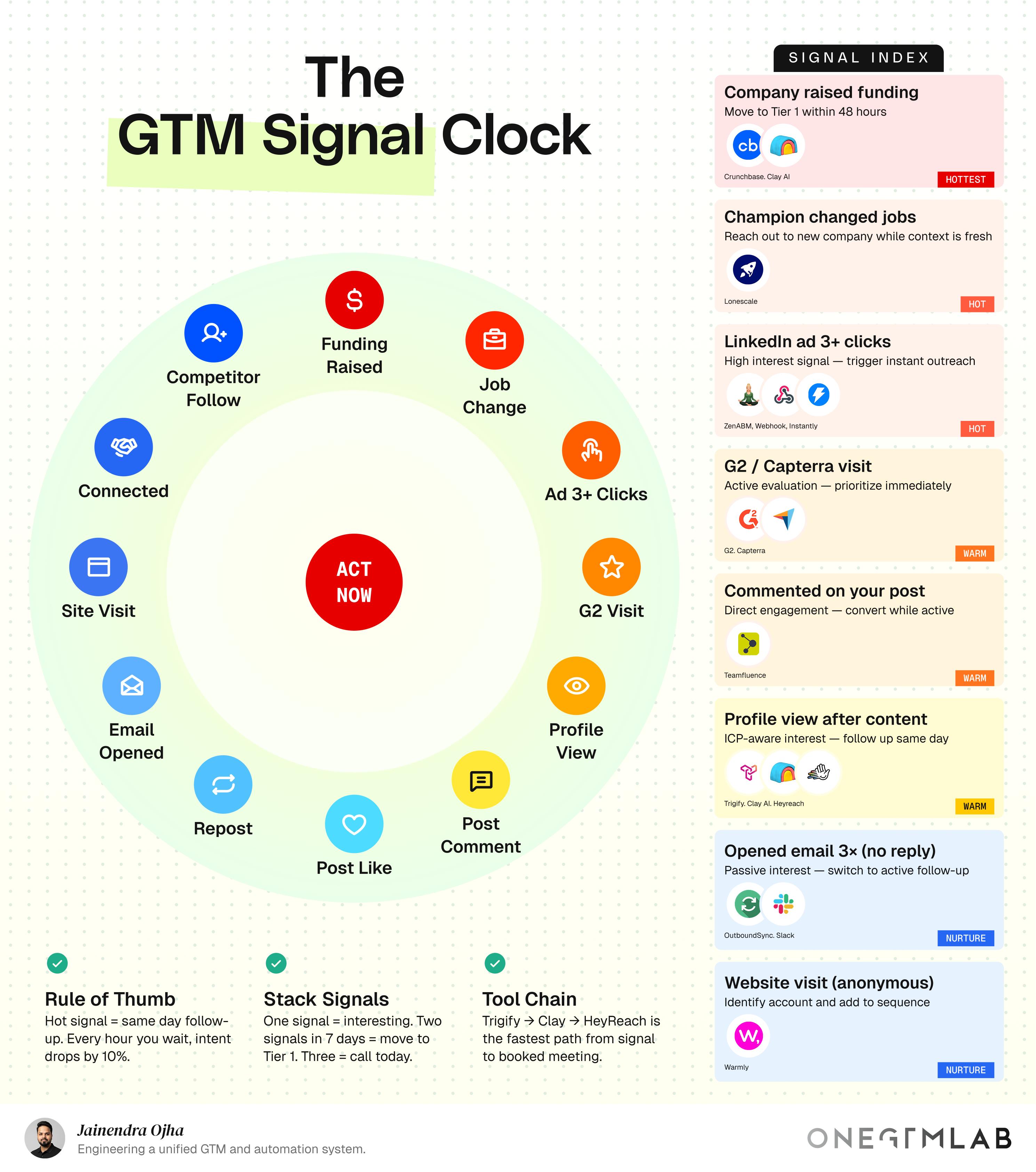
Your stack detected a funding signal. On a Monday.
Your AE actioned it on Thursday.
The competitor who called Tuesday got the meeting.
Sound familiar? Detection isn't your problem. Execution is. This guide gives you the five-step system to fix that, before your signals expire quietly in a Slack channel nobody reads.
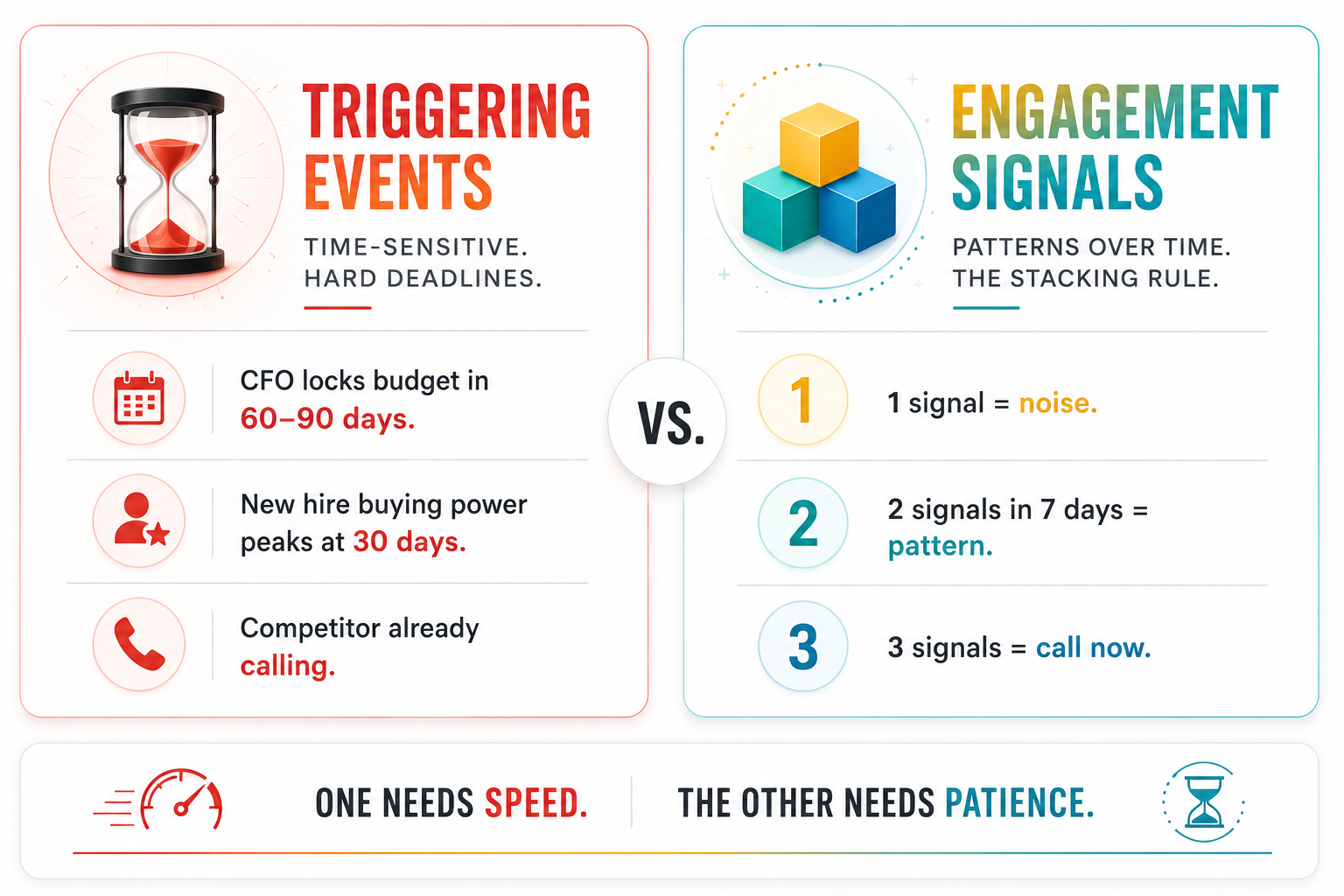
Triggering Events vs. Engagement Signals: Why the Distinction Changes Your Response Model
Most RevOps teams treat all intent signals as variations of the same input, something happened, alert the rep. This is the root cause of most signal-response failures, because triggering events and engagement signals are fundamentally different in nature, urgency, and the action they warrant.
↳ Triggering Events
These have a hard expiry date.
A funding raise. A champion changing jobs. When either fires, there's a buying window, and it closes whether you show up or not. A CFO locks post-raise budgets within 60–90 days. A new hire's buying authority peaks in the first 30 days. After that? They've made their picks.
↳ Engagement Signals
These are probabilistic. One signal is noise. Two is a pattern. Three is a phone call.
A G2 visit. Three LinkedIn ad clicks. A post comment. Any single one of these could be an intern doing research on a Friday afternoon. But the same account clicking your ad, then visiting your G2 profile, then viewing your CRO's LinkedIn, in seven days? That's a buyer building a shortlist.
When to treat a signal as a triggering event
Act unilaterally, regardless of other signal context. Set a time-to-action ceiling 48 hours for funding raises, same day for champion job changes, and treat it as non-negotiable.
Best for: funding raises, job changes, competitor follows identified by your outbound team.
When to treat a signal as an engagement signal
Monitor and stack before acting. One signal alone gets tagged and watched. Two signals from the same account within seven days move it to Tier 1. Three signals trigger a human-touch call, bypassing automated sequences entirely.
Best for: ad clicks, G2 visits, LinkedIn profile views, post comments, email opens, site visits.
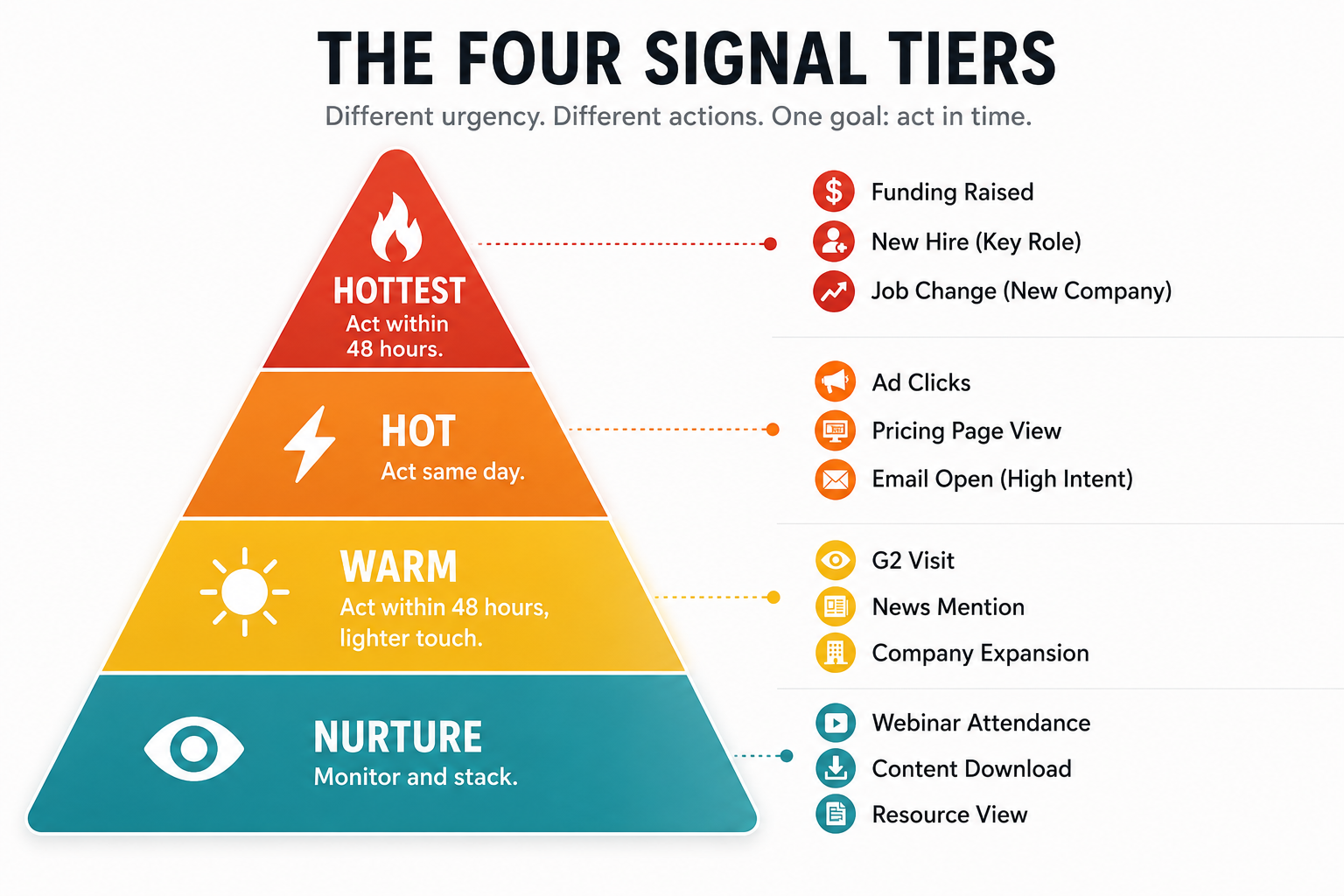
The 4 Signal Tiers and What They Demand
Tier labels aren't a ranking of signal quality, they're a prescription for response speed. A NURTURE-tier signal from a Tier 1 ICP account still matters more than a HOTTEST-tier signal from a company outside your ICP. The tier tells you how fast to act; your ICP scoring tells you how hard.
What Makes a Signal HOTTEST vs. WARM?
The distinction comes down to two factors:
↳ Whether the signal is a triggering event (external, time-bound) or an engagement signal (behavioral, probabilistic)
↳ How many signals have stacked from the same account within seven days.
HOTTEST and HOT signals are almost always triggering events, they don't require stacking to justify action. WARM signals are engagement signals that have stacked to a threshold. NURTURE signals are single-instance engagement signals not yet worth escalating.
HOTTEST: Act Within 48 Hours
Reserved for triggering events with hard expiration windows.
The right response is immediate, human-touch outreach to the full buying committee, not an automated sequence.
Funding raises belong here: Crunchbase detects the event, Clay identifies the relevant contacts (VP of Ops, CRO, Head of IT depending on your product), and a personalized email goes out within 48 hours.
An SDR who waits until their Friday pipeline review to action a Monday funding signal has already lost two to three days of window.
HOT: Act Same Day
High-conviction engagement signals that indicate active in-market behavior.
A champion changing jobs is the canonical HOT signal: you have an existing relationship, they have a mandate to build a stack in their new role, and the first 30 days are the window.
Tools like Lonescale automate detection and CRM updates; your job is to ensure the rep gets the alert and acts before the contact has made their picks.
LinkedIn ad 3+ clicks also belongs here: three touches from one user means they're actively evaluating whether your product applies to them. That's the moment to reach out, not when they fill out a form.
WARM: Act Same Day, Lighter Touch
Engagement signals that indicate evaluation-stage behavior but not yet purchase urgency.
A G2 or Capterra visit is the clearest example: the person is building a vendor shortlist. If you're already on the list, this confirms it. If you're not, this is your signal to try a flanking approach, a referral path, a champion in the account, or a LinkedIn DM from a credible team member.
Post comments and profile-view sequences also land here. The response should feel like a warm follow-up from someone paying attention, not a cold pitch.
NURTURE: Monitor and Stack
Low-conviction signals that become meaningful in combination.
Three email opens without a reply tells you the person is reading but not ready. An anonymous site visit tells you someone from the account is curious. Neither warrants immediate outreach.
The right move is to de-anonymize where possible (Warmly, RB2B, or Koala for site visits), tag the account, monitor for the next signal, and be ready to escalate when the pattern completes.
How to Build a GTM Signal Response System: A 5-Step Process
Most teams have pieces of this, a signal detection tool here, a CRM workflow there, an SDR who occasionally actions intent data. What they're missing is the unified routing layer that makes the whole system automatic. Here's how to build it in sequence.
Step 1: Audit Which Signal Types Your Stack Currently Detects
Before you can respond to signals, you need to know which ones your current tools actually capture. Map your stack against the full signal taxonomy:
- Funding raises: Crunchbase, Apollo
- Job changes: Lonescale, LinkedIn Sales Navigator
- LinkedIn ad clicks: ZenABM, native LinkedIn Campaign Manager
- G2/Capterra visits: G2 Buyer Intent, Capterra profile analytics
- Post engagement: Teamfluence, Trigify
- Profile views: Trigify
- Email opens: Instantly, Smartlead, Lemlist via OutboundSync
- Site visits: Warmly, RB2B, Koala
- Social signals (competitor follows, connections): Trigify
Most RevOps teams find they're detecting four to six of these twelve cleanly and missing the rest, particularly social engagement signals, which are increasingly valuable as LinkedIn has become the primary channel for B2B research.
The gaps in your detection layer are your first priority.
Pro tip: Don't assume that because a tool can detect a signal, it's flowing into your CRM.
Run a 30-day retroactive audit: pull every account that engaged with a LinkedIn ad, visited your G2 profile, or opened an email three or more times, and check whether those signals are visible in Salesforce or HubSpot. In most orgs, they're not, the tools fire, the webhook fails, and no one notices.
Step 2: Classify Every Signal by Type and Assign a Default Tier
Once you know what you're detecting, assign every signal type to a default tier (HOTTEST, HOT, WARM, NURTURE) based on the response speed it warrants.
This classification should be in writing, agreed upon by Sales and RevOps, and encoded into your CRM as automation logic, not left to individual reps to decide at the moment.
Here's where RevOps teams create real leverage: tier assignment isn't just about signal type. It's a 2D matrix of signal urgency × ICP fit score.
- A funding raise from a company that scores 90/100 on ICP fit → HOTTEST, act within 24 hours.
- A funding raise from a company that scores 30/100 → log it, but don't burn rep capacity.
In [PRODUCT], this matrix is encoded as an ICP Routing Rule, a configurable threshold that auto-promotes accounts when both signal urgency and ICP score exceed the values your team sets.
Pro tip: Build a signal fatigue rule from day one.
If your system fires a HOTTEST alert for every funding raise in your database regardless of ICP fit, reps will stop trusting alerts within 60 days. Gate HOTTEST classification on ICP score ≥ 70 minimum.
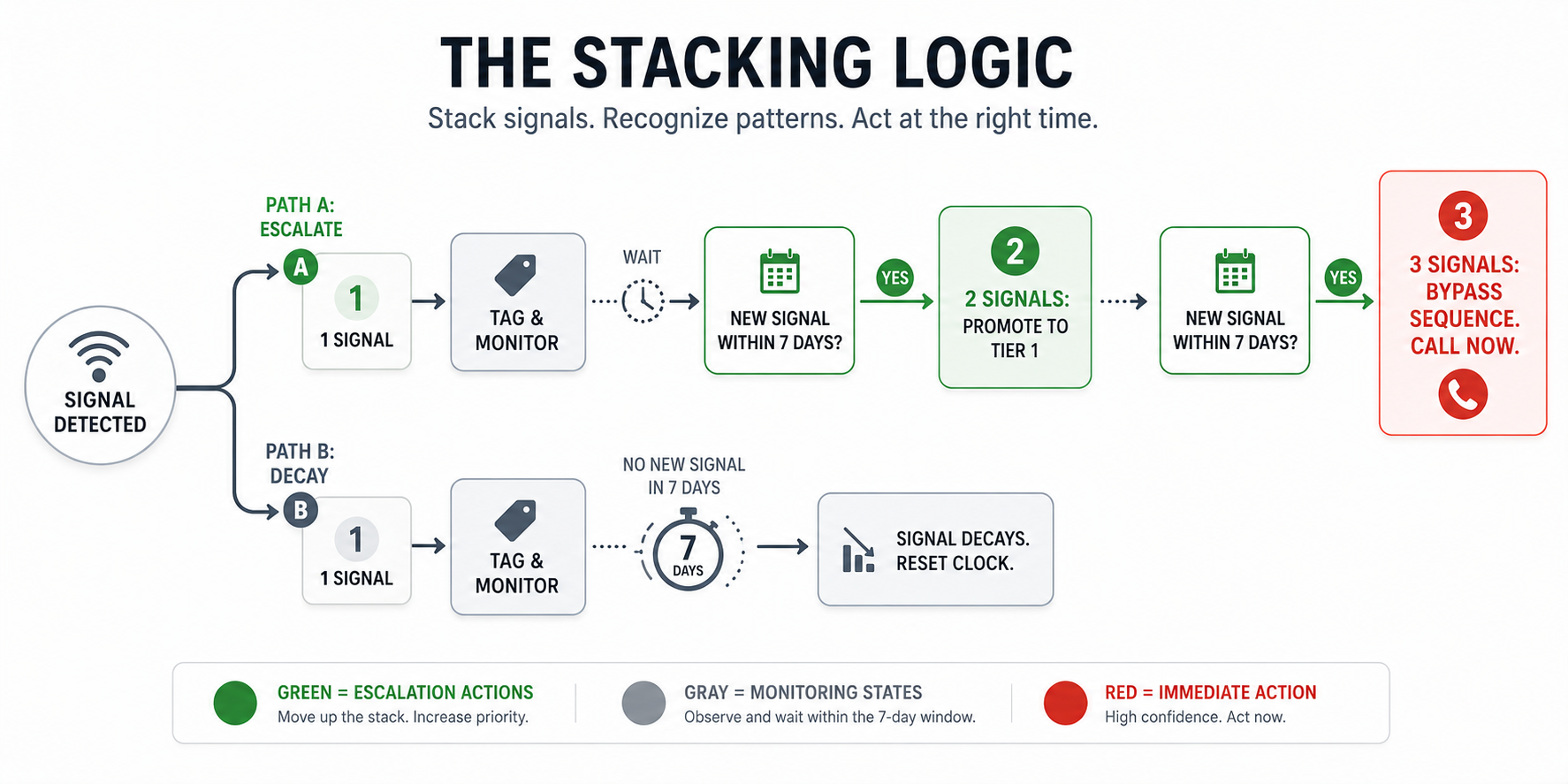
Step 3: Implement the Stacking Logic
The stacking rule is the most operationally important decision in building this system. The default logic:
- One signal = tag and monitor
- Two signals from the same account within seven days = auto-promote to Tier 1
- Three signals = bypass sequences entirely, create a task for immediate human-touch outreach
7 days is the right window because it's tight enough to indicate active exploration, but long enough to capture a real evaluation cycle that unfolds over a week of research. Thirty days creates too many false positives.
24 hours misses legitimate multi-touch patterns.
This means building a webhook or native integration from each signal source into your CRM, and a field (or set of fields) that tracks signal count and recency per account.
[PRODUCT]'s Signal Stack Score handles this automatically, every signal that routes into the system increments the account's score, decays after seven days of inactivity, and triggers a Tier 1 promotion alert to the assigned rep when the threshold is crossed.
Pro tip: Stacking only works if your signal sources are de-duplicated at the account level.
If your CRM has three records for the same company under different names, the stacking logic fires for the wrong account. Clean up account deduplication before you build the stacking layer, not after.
Step 4: Map the Tool Chain for Each Signal Type
Different signals require different response paths.
- The canonical tool chain for social signals is Trigify → Clay → HeyReach: Trigify monitors LinkedIn engagement with ICP filtering and sends qualified signals via webhook to Clay, which enriches and qualifies, and HeyReach executes the LinkedIn DM.
- For email signals, the chain is different: OutboundSync → CRM alert → rep channel switch (LinkedIn DM or cold call — not more email).
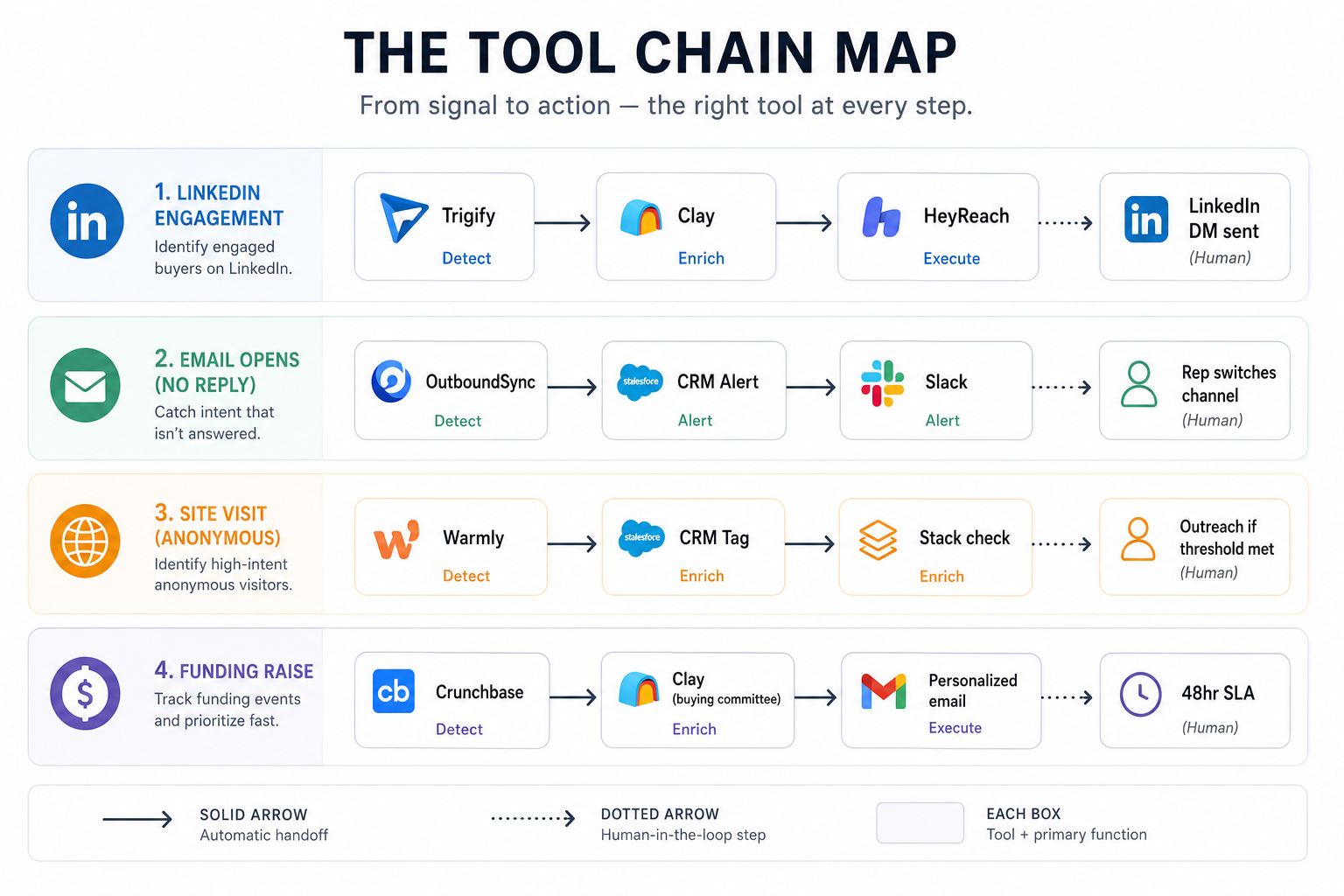
The mistake most teams make is routing all signals through the same tool chain.
A LinkedIn engagement signal should almost never result in a cold email as the first touch.
A funding trigger warrants a personalized email to the full buying committee, not a generic LinkedIn connection request. Tool chain selection is part of the response protocol.
Document these chains explicitly. For each signal type your stack detects, define: which tool detects it, where it routes (CRM field, Slack alert, Clay webhook), which tool executes outreach, and what the message framework is.
Pro tip: For anonymous site visits (NURTURE tier), resist the temptation to add the account to an outbound sequence immediately.
The correct first step is to check whether you already have an open opportunity or active SDR sequence for that account. Warming up an account you're already working creates confusion and damages the relationship. Gate site-visit-triggered outreach on "no active opportunity" logic.
Step 5: Build the Alert and SLA Layer
A signal response system without accountability is an expensive notification service. Assign SLAs for each tier:
- HOTTEST: Human action within 24 hours (not a sequence trigger, a human action)
- HOT: Same-day action
- WARM: Within 48 hours
- NURTURE: Automated, no SLA required
Track compliance. [PRODUCT]'s Response SLA Dashboard shows time-to-first-action by signal tier and by rep, with amber and red flags for missed windows.
In most teams, this single metric reveals more execution breakdown than any other. Signals aren't failing to convert because the intent data is bad, they're failing because reps are actioning HOTTEST alerts three to five days late with no visibility into the delay.
Real Results: How a Series B SaaS Team Cut Signal-to-Meeting Time by 83%
A 180-person revenue intelligence SaaS company came to us with a signal response problem that's typical for teams at their stage.
They had Crunchbase, ZenABM, and G2 Buyer Intent all configured and flowing data, but all three fed into a shared Slack channel that their four SDRs monitored manually.
There was no ICP filter, no tier assignment, no stacking logic. Every signal fired the same alert. Every alert competed for the same SDR attention. High-priority funding signals sat next to anonymous site visits from companies two sizes outside their ICP.
The challenge: Average time-to-first-action on funding signals (their highest-intent trigger) was 71 hours. Their most time-sensitive buying window was being treated like routine pipeline hygiene.
What they built: Using [PRODUCT], they implemented the 2D tier matrix (signal urgency × ICP score), stacking logic with a seven-day window, and dedicated tool chains for each of their four highest-volume signal types, funding raises, G2 visits, LinkedIn ad clicks, and job changes.
Funding raises routed to a dedicated "HOTTEST" Salesforce queue with a 24-hour SLA hard-coded in the rep's task. Lower-tier signals were either automated or monitored without rep notification until stacked.
The outcome:
- Average time-to-first-action on HOTTEST signals: 71 hours → 12 hours (83% reduction)
- Meeting conversion rate on funded accounts: improved from 4% to 9% within 60 days of implementation
- SDR alert fatigue: Slack signal volume reduced by 67% after ICP filtering was applied, reps received fewer alerts, but every alert was actionable
4 Mistakes RevOps Leaders Make With Intent Signals
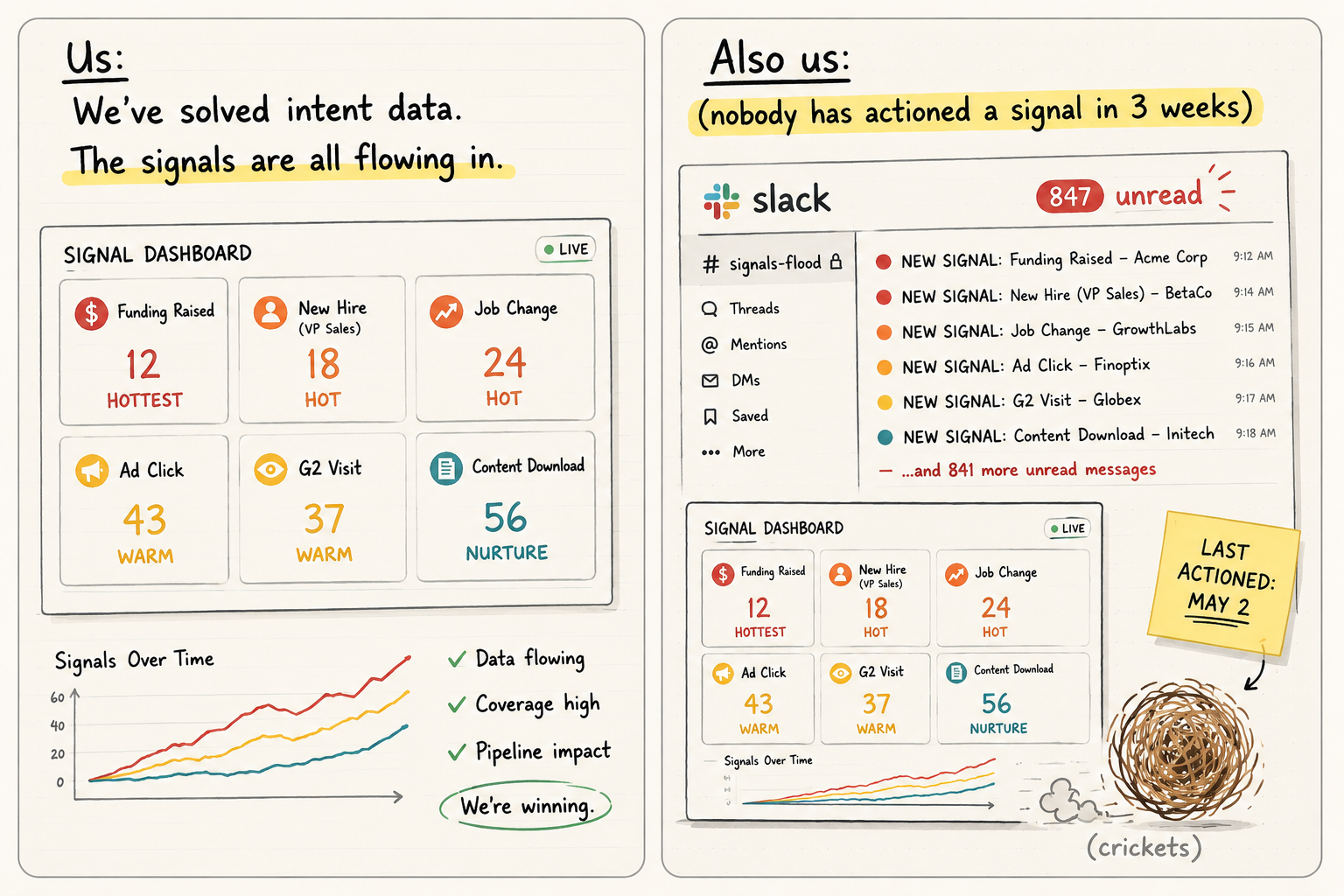
Mistake 1# Treating Signal Detection as Signal Response
The most common failure pattern: a team purchases an intent data provider, routes signals to a Slack channel, and declares the problem solved.
Sixty days later, the channel has 400 unread notifications and zero actions taken. Detection is a data problem. Response is an operational problem. They require different infrastructure.
The fix
Separate your signal detection layer (what fired?) from your response routing layer (who acts, with what message, in what timeframe?) from your accountability layer (did they act, and how fast?). These are three distinct system components, not one.
Mistake 2# Using the Same Outreach Template Across All Signal Types
A funding raise warrants a personalized email to the buying committee that references the specific round and connects it to a relevant pain point. A post comment warrants a same-day LinkedIn DM that acknowledges what they wrote.
Using the same cold outreach template for both destroys response rates. The signal told you something specific about where they are in the buying process, the outreach should reflect that.
The fix
Build a message framework for each tier, not each signal type. HOTTEST signals get a personalized buying-committee email. HOT signals get a channel-matched personal note. WARM signals get a content-led touchpoint. NURTURE signals are automated.
Mistake 3# Stacking Without a De-Duplication Rule
If your stacking logic counts a site visit from a bot or double-counts the same email open from two different tracking pixels, your Tier 1 list becomes noise.
Reps learn quickly when the signals they're actioning are false positives, and they stop trusting the system entirely.
The fix
Count unique signal types, not signal instances. One G2 visit + one ad click = two signal types stacked, worth escalating.
Three G2 visits = one signal type seen three times, worth noting but not escalating on its own.
Mistake 4# Missing the Loop-Back Logic
Most signal response systems are built as one-way flows: signal fires → rep acts → deal won or lost → end. But the majority of signals don't convert on the first touch. The account goes cold, re-engages three weeks later, and there's no system to detect the re-engagement and re-route it.
The fix
Build a loop-back rule that restarts the stacking logic after a cooling-off period. If a rep actioned a WARM signal, the account went quiet, and then the same account visits G2 again six weeks later, that's a new signal entry point, not a continuation of the old one. The CRM should treat it as a fresh stack.
Your Signal Response Audit Checklist
Use this checklist quarterly to assess whether your signal response system is functioning or just creating the appearance of intent data maturity.
LinkedIn's 2024 B2B Buyer Journey Report confirms that B2B buyers engage across an average of six to ten touchpoints before a sales conversation, a well-functioning signal system ensures you're capturing and responding to the right ones.
1. Signal Coverage Rate Of the 12 standard GTM signal types, how many does your stack currently detect and route to CRM? Target: 8 or more. Below 6: you have significant blind spots in your detection layer.
2. Signal-to-Action Rate by Tier What percentage of HOTTEST-tier signals receive a human-touch action within 24 hours? What percentage of HOT-tier signals receive same-day action? If HOTTEST SLA compliance is below 80%, the bottleneck is likely alert routing — not rep capacity.
3. Stacking Trigger Rate What percentage of your Tier 1 outbound pipeline was sourced from stacked signals (2+ signals in 7 days) vs. single-signal triggers? High single-signal sourcing suggests your stacking logic isn't working or your signal detection is too sparse to stack naturally.
4. Signal-to-Meeting Rate by Signal Type Break your meeting-booked rate by the signal type that triggered outreach. HOTTEST and HOT signals should convert to meetings at a materially higher rate than WARM signals, which in turn should outperform NURTURE signals. If your HOTTEST signals aren't at the top of that range, the issue is message framework, not signal quality.
5. Channel Match Rate Are your outreach channel selections matching the signal source? LinkedIn engagement signals should result in LinkedIn DM outreach, not cold email. Email engagement signals should result in a channel switch (LinkedIn or phone). If your tool chain defaults all signals to cold email regardless of source, you're leaving response rate on the table.
6. Time-to-First-Action Metric Median time from signal detection to first rep action, by tier. Every hour beyond the SLA ceiling represents measurable intent decay. If your median for HOTTEST tier is 72 hours, you're competing against yourself. Track this weekly, not quarterly.
Signals don't fail. Systems do. Build the routing layer, enforce the SLAs, and the only thing left between your team and the meeting is how fast they move.
People Also Ask: Quick Answers to the Real Questions
The upside is simplicity and low cost. The downside is concentration risk. The practical answer is to keep critical workloads distributed across at least two layers.
The gap reflects real differences in maturity, reliability, and the skill required to operate each layer effectively.
The migration is not trivial, and edge cases will surface. Budget time for rebuilding workflows, not just recreating them. Run both in parallel during transition.
Microsoft Copilot is embedded in the Microsoft 365 suite and wins on enterprise integration with Teams, Outlook, and SharePoint. For teams already deep in Microsoft infrastructure, Copilot has less friction. For teams building custom GTM workflows from scratch, Cowork's flexibility gives it an edge.
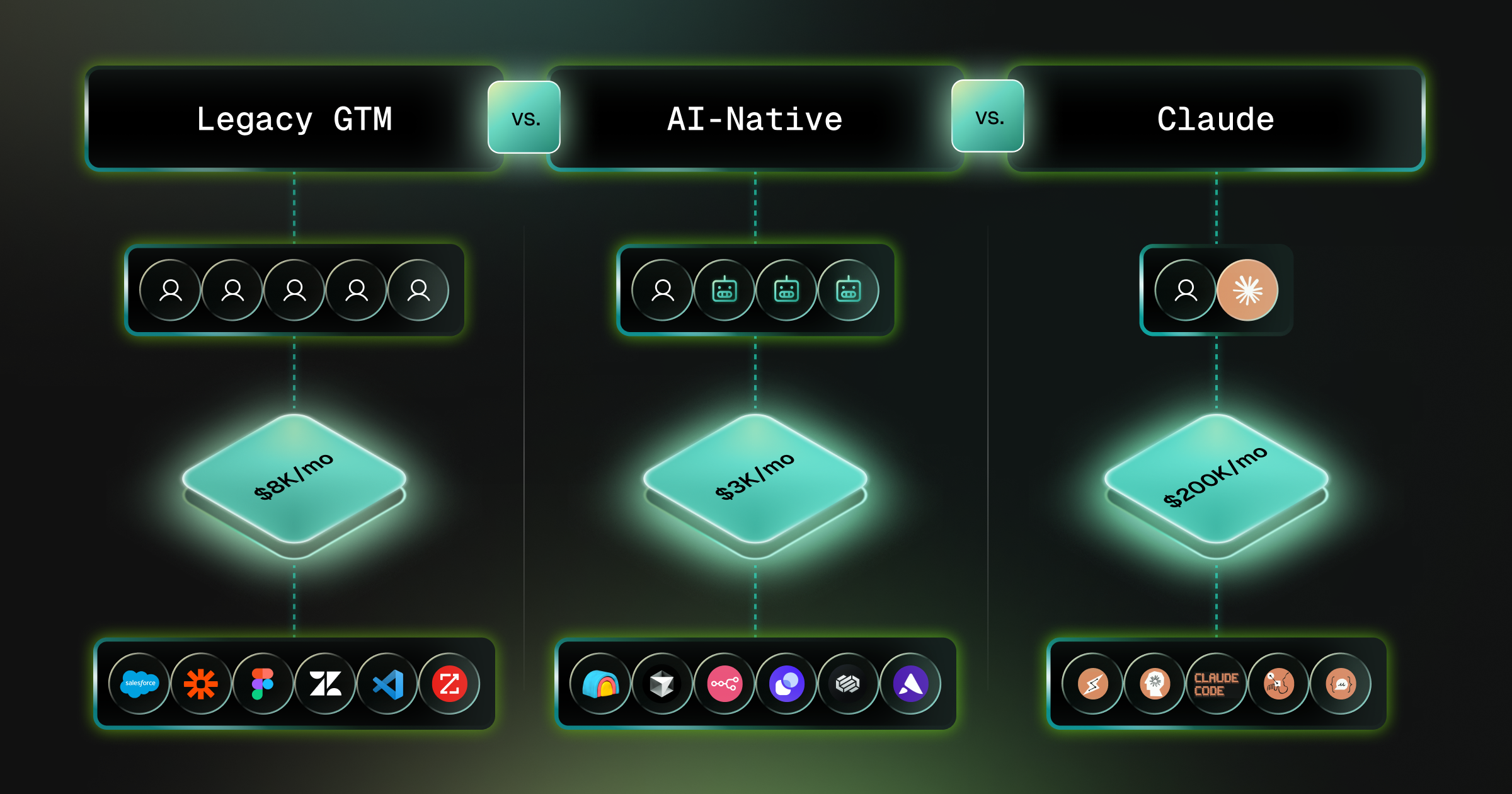
This stack runs well under $3,000 per month for most agency sizes and delivers output that would have required a five-person ops team in 2023.
The AI-native and Claude layers are increasingly meeting these benchmarks for internal workflows, but most regulated enterprises still keep legacy tools in customer-facing and compliance-critical positions.

.png)