

The Automated LinkedIn Content Distribution System For B2B Business
Stop throwing great content into the algorithmic void, that’s not going to help.
Let’s be honest for a second.
Our modern buyers don't have time to hunt down our content; we have to reach them where they already spend their time i.e., LinkedIn.
Naturally, every marketer knows this.
That’s why 97% of B2B marketers rely on LinkedIn for content distribution, turning the feed into the undisputed heavyweight champion for demand generation.
Now the problem is everyone is shouting in the same digital room.
And most teams end up treating LinkedIn like a lottery machine, posting randomly, praying for algorithm magic, and having zero mechanism to turn a "like" into an actual sales meeting.
If you’re tired of reinventing the wheel every Monday morning, guessing what to post, and manually hunting down engagement signals, take a deep breath.
You don't need to build a complex growth machine from scratch.
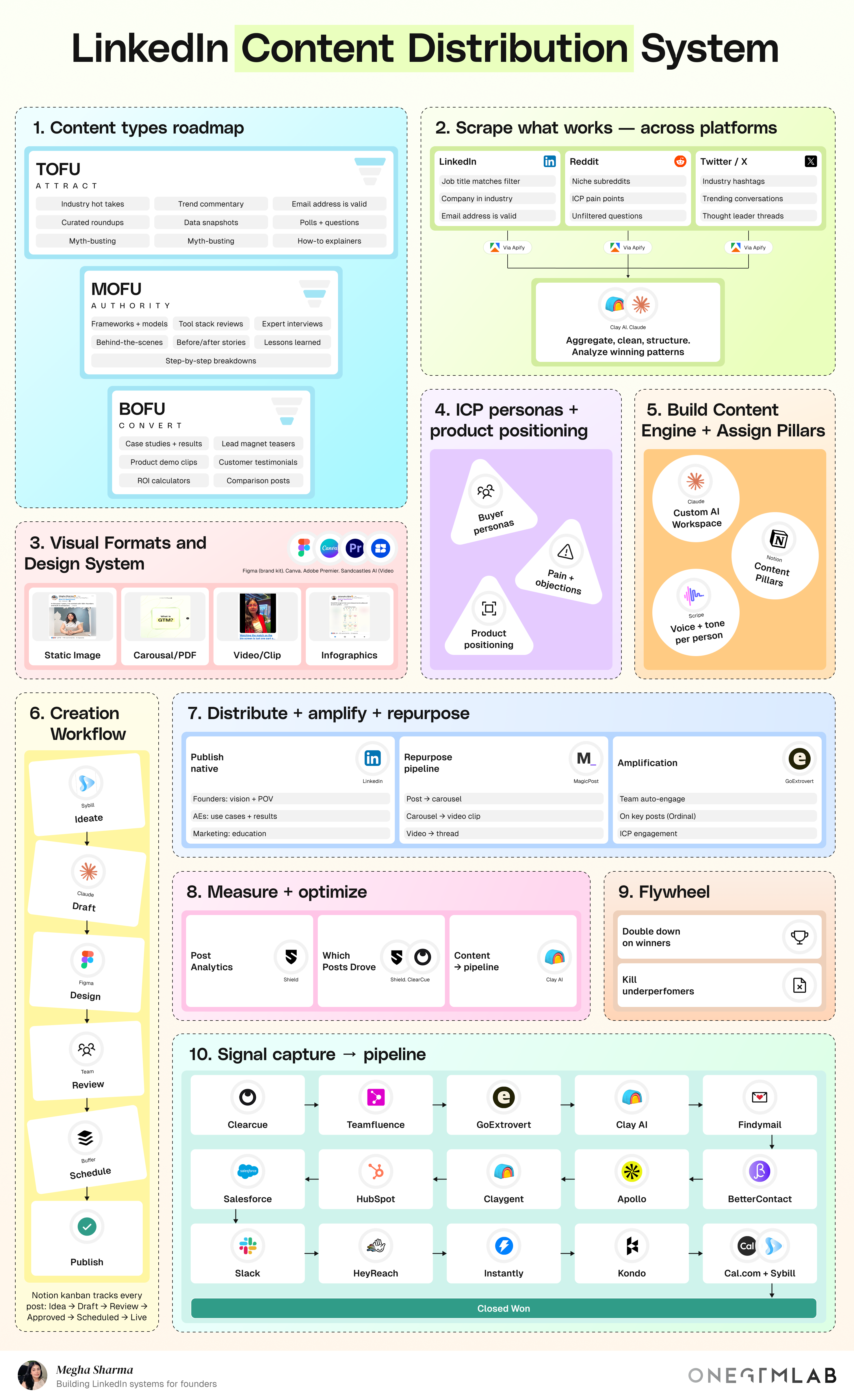
We at ONEGTMLAM have already built and mapped out the exact LinkedIn Content Distribution System you need to automate market research, systematize content creation, and turn profile views directly into closed-won deals.
So let’s dive in.
Breakdown Of LinkedIn Content Distribution System
To make this easy to implement, we’ve broken down the system into sequential phases. Under each phase, you’ll find the exact step-by-step process alongside the specific tool stack required to execute it.
Phase 1: Strategic Foundations & Audience Mapping
Before writing a single line of copy or setting up automated software, you need to define who you are speaking to. Because, if you try to speak to everyone, nobody listens.
Step 1: Define Your Target Audience (ICP) & Product Positioning
You cannot sell a solution if you don't know who has the problem.
In this step, you document the exact person you want to attract and what makes your product worth buying.
Here’re the 3 core components (Jot it down):
- Buyer Personas: Not vague descriptions like "marketing professionals," but exact roles:
- Job Title: VP of Sales or Chief Revenue Officer (CRO).
- Company Size: B2B SaaS companies with 50–200 employees.
- Budget: Spending at least $5,000/month on sales tech.
- Pain Points & Objections: Pain point can be "Our outbound email open rates dropped from 40% to 12% this year."And objection can be "We tried agency outreach before, and they just sent spam to our buyers."
- Product Positioning: Your value proposition can be "We use intent-driven LinkedIn content to reach buyers who are already engaging with industry topics, so outreach never feels like cold spam."
Tools That You Can Use For Executing This Step
- Internal Workspaces (Notion, Google Docs): Create a permanent document titled ICP_Master_Profile.
- Call Intelligence (Gong / Otter.ai): Read or listen to call recordings of your best customers. Extract the exact words, slang, and complaints they use when describing their problems.
Why This Step Cannot Be Ignored?
If you skip this, your content copy will sound generic. Generic copy gets ignored by high-paying decision-makers.
Step 2: Build Your Content Types Roadmap (The Funnel)
See you need to understand, a buyer rarely purchases the first time they see your post. You must create content for every stage of their mental buying journey: TOFU, MOFU, and BOFU.
Here’s detailed breakdown of the 3 Levels:
Level 1: TOFU (Top of Funnel - Attract)
- Goal: Maximum broad views and profile traffic.
- Topic Focus: General industry observations, common mistakes, or hot takes.
- Example Post: "90% of cold email outreach is dead in 2026. Here are the 3 shifts happening in B2B sales right now..."
Level 2: MOFU (Middle of Funnel - Build Authority)
- Goal: Show that you actually know how to solve the problem step-by-step.
- Topic Focus: Deep teardowns, frameworks, and actionable guides.
- Example Post: "Here is our 5-step framework to extract engagement data from LinkedIn and turn it into verified business email addresses inside Notion."
Level 3: BOFU (Bottom of Funnel - Convert)
- Goal: Get qualified buyers to request a demo, click a booking link, or send a direct message (DM).
- Topic Focus: Real client results, ROI metrics, and product walk-throughs.
- Example Post: "How we helped [Client Company] generate $140k in pipeline from 10 LinkedIn posts without spending a dollar on ads. (Link to case study below)."
Tools That You Can Use For Executing This Step
- Content Database (Notion / Airtable): Build a content calendar with tags for TOFU, MOFU, and BOFU. Aim for a ratio of 40% TOFU, 40% MOFU, and 20% BOFU.
Why To Focus On This Step?
If you only post TOFU, you get 100,000 views but $0 in sales. If you only post BOFU, no one follows you because your account reads like a continuous advertisement. You need the mix.
Phase 2: Market Research & Knowledge Systems
Instead of guessing what to post, we'll use scrapers to spot viral trends and feed them to AI to draft killer posts in seconds. Moreover, why guess what works when the internet already has the answers?
Step 3: Scrape Proven Content Across Platforms
Instead of staring at a blank screen trying to be creative, you set up digital scrapers to monitor what topics are already going viral across LinkedIn, Reddit, and X (Twitter) in your industry niche.
Suppose you want to write about "B2B Lead Generation":
- You identify 10 thought leaders on LinkedIn, 3 niche subreddits (e.g., r/sales, r/b2bmarketing), and 5 Twitter accounts.
- An automated scraper runs every night, pulling every post that received over 100 likes or 50 comments in the last 7 days.
- The scraper organizes the output into a spreadsheet containing:
- Post Text
- Engagement Score (Likes + Comments)
- Core Question Asked in the comment section.
Tools That You Can Use For Executing This Step
- Apify / Bright Data: Cloud-based scraping software. You paste in the target URLs or keywords, and it automatically extracts raw text data into a spreadsheet.
- Clay: An automated data table tool. It ingests the raw scraped spreadsheet and uses AI to clean up messy formatting, remove spam posts, and output a clean list of top-performing post ideas.
Why Is This Step Necessary?
It replaces guesswork with real audience data. You know a topic is worth writing about because hundreds of people have already engaged with it.
Step 4: Build Your Custom AI Workspace & Content Hub
Taking the scraped data from Step 3 and feeding it into an AI workspace (like Claude or ChatGPT) that has been pre-trained on your brand voice, customer personas, and formatting rules.
How to build it (Step-by-Step)?
- Create a System Prompt in Claude/OpenAI: Paste in your ICP_Master_Profile from Step 1.
- Define Rules: Tell the AI:
- "Never use corporate jargon like 'synergy', 'game-changer', or 'delve'."
- "Write in short, punchy sentences."
- "Structure posts with a strong hook in line 1, short context in lines 2–5, and a clear takeaway at the end."
- Feed Scraped Inputs: Give the AI a raw scraped post topic from Step 3.
- Output: The AI generates a tailored, high-quality post draft matching your brand voice in under 30 seconds.
Tools That You Can Use For Executing This Step
- Notion: Stores all your custom AI prompts, brand guidelines, and post pillars in one place.
- Claude / OpenAI API: Generates the content drafts based on your custom-trained workspace.
Why This Step Cannot Be Ignored?
It speeds up drafting from 2 hours per post down to 10 minutes, allowing a small team to produce high volume without sacrificing quality.
Phase 3: Content Design & Production Pipeline
You need to get one thing straight, words bring value, but visuals grab the attention.
In this phase, we set up simple design rules and a smooth pipeline so your content looks like it was made by a full creative agency.
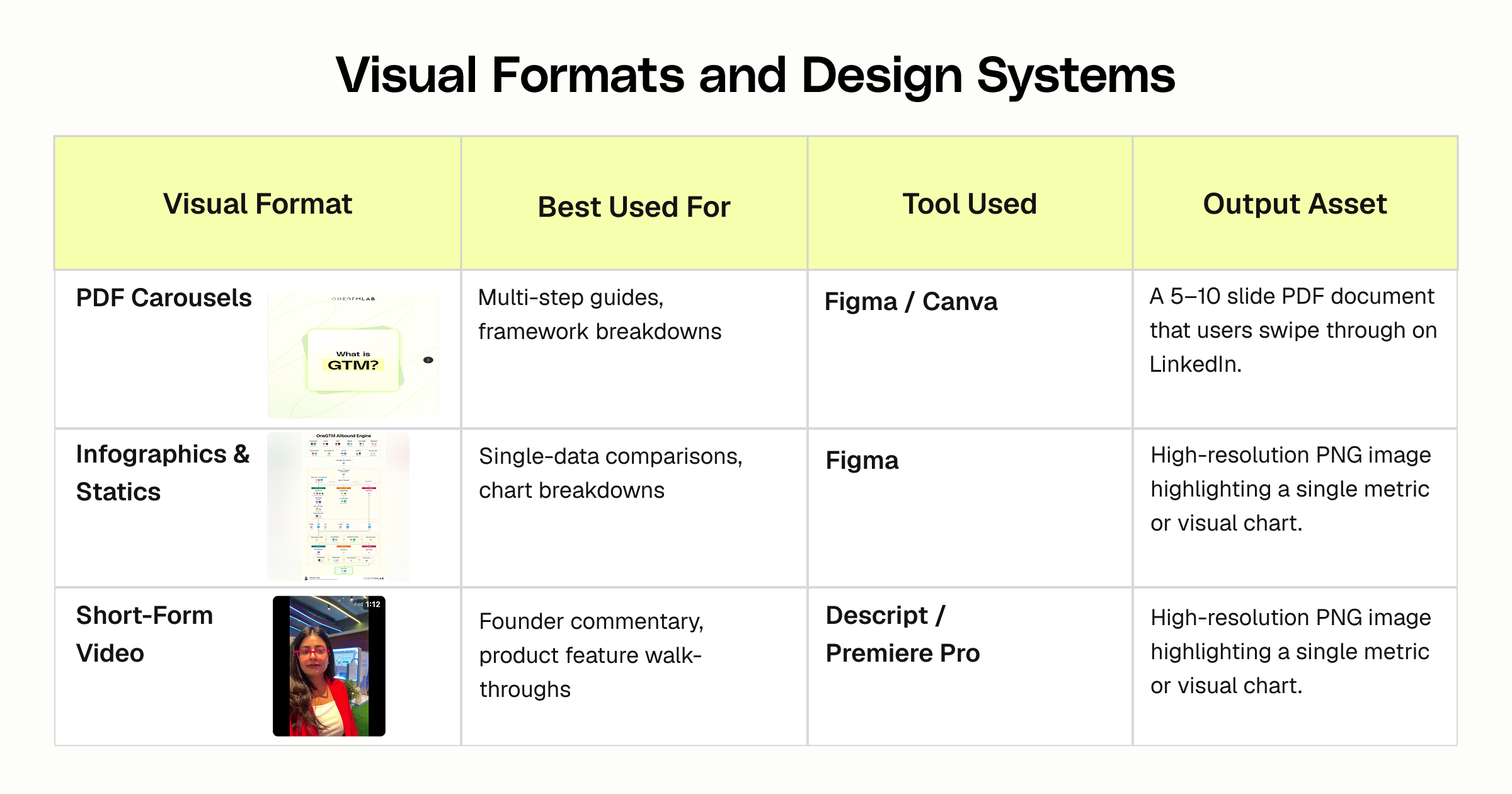
Step 5: Visual Formats and Design Systems
Text-only posts work, but rich media (PDF slide carousels, infographics, and short video clips) gets much higher engagement on LinkedIn because it stops users from scrolling past.
Format Breakdown:
Why Not To Overlook This Step?
LinkedIn’s algorithm prioritizes dwell time (how long a user spends looking at your post). Multi-slide PDF carousels force users to spend more time on your post, signaling the platform to push it to a broader audience.
Step 6: Creation Workflow Kanban
Treating post creation like a physical factory assembly line. A post moves through fixed stages from left to right on a digital board.
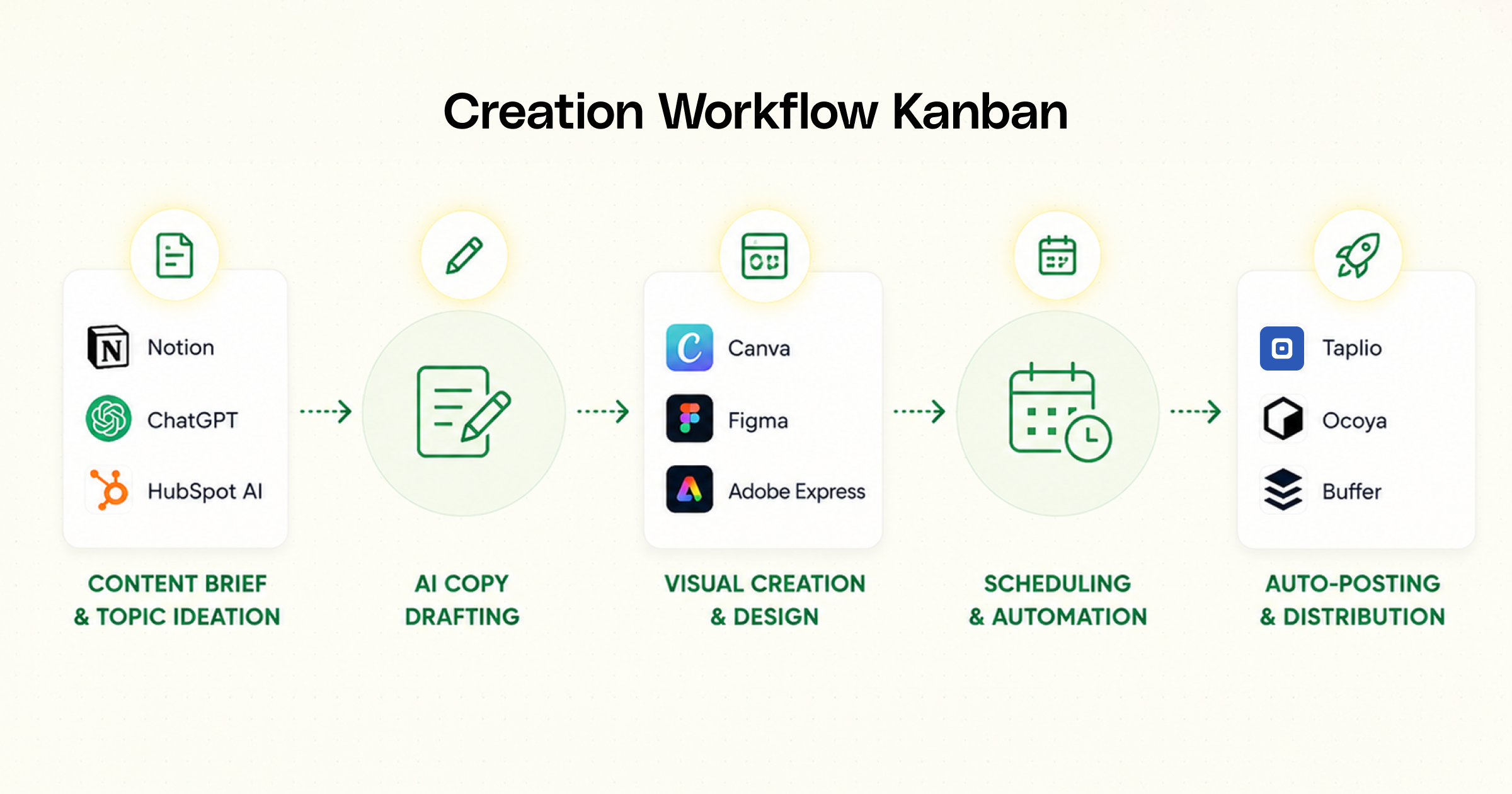
Here’s detailed stage breakdown:
- Ideation: Raw ideas, scraped Reddit threads, or sales team notes are added as cards in Notion.
- Drafting: Copywriters or AI generate the written text.
- Design: A designer takes the written copy and formats it into a slide carousel (Figma) or edits the video clip (Descript).
- Review: The Marketing Director or Founder reviews the finished asset for accuracy, tone, and positioning.
- Scheduled: The finalized post is uploaded into a scheduling tool (Taplio, Buffer, or Typefully) and set to auto-publish at a specific time.
Tools That You Can Use For Executing This Step
- Notion Kanban Board / Trello: Tracks every post card through the pipeline.
- Taplio / Buffer: Holds the scheduled posts and pushes them live automatically to LinkedIn.
Why Is This Step Necessary?
It eliminates missing deadlines, prevents publishing typos, and ensures you always have 1–2 weeks of content queued up in advance.
Phase 4: Distribution, Amplification & Growth
Don't let good content die in silence. We’ll show you how to amplify your reach across platforms and build a data feedback loop so your posts get smarter every single month.
Step 7: Distribute + Amplify + Repurpose
Publishing a post to LinkedIn is only the starting line. To maximize reach, you need to amplify the post immediately and reformat it for other platforms.
The 3 action rules, you must follow by heart:
- Native Distribution: Publish text, carousels, or native videos directly on LinkedIn. Place external website links in the comments section rather than the main post body, as LinkedIn penalizes posts containing outbound links that take users off their platform.
- Team Amplification: When a post goes live, send an automated notification to an internal team channel on Slack. Team members like and leave genuine comments within the first 30 minutes. This signals to LinkedIn's algorithm that the post is engaging, prompting it to show it to external feeds.
- Repurposing Pipeline: Take a high-performing LinkedIn carousel and:
- Re-format the text into an X (Twitter) Thread.
- Copy the core lesson into a Medium/Substack Newsletter.
- Turn the key bullet points into an email sequence.
Why You Shouldn’t Ignore This Step?
It multiplies the value of every single post you make without requiring you to write new topics from scratch every day.
Steps 8 & 9: Analytics & The Growth Flywheel
Tracking performance metrics to systematically do more of what works and eliminate what fails.
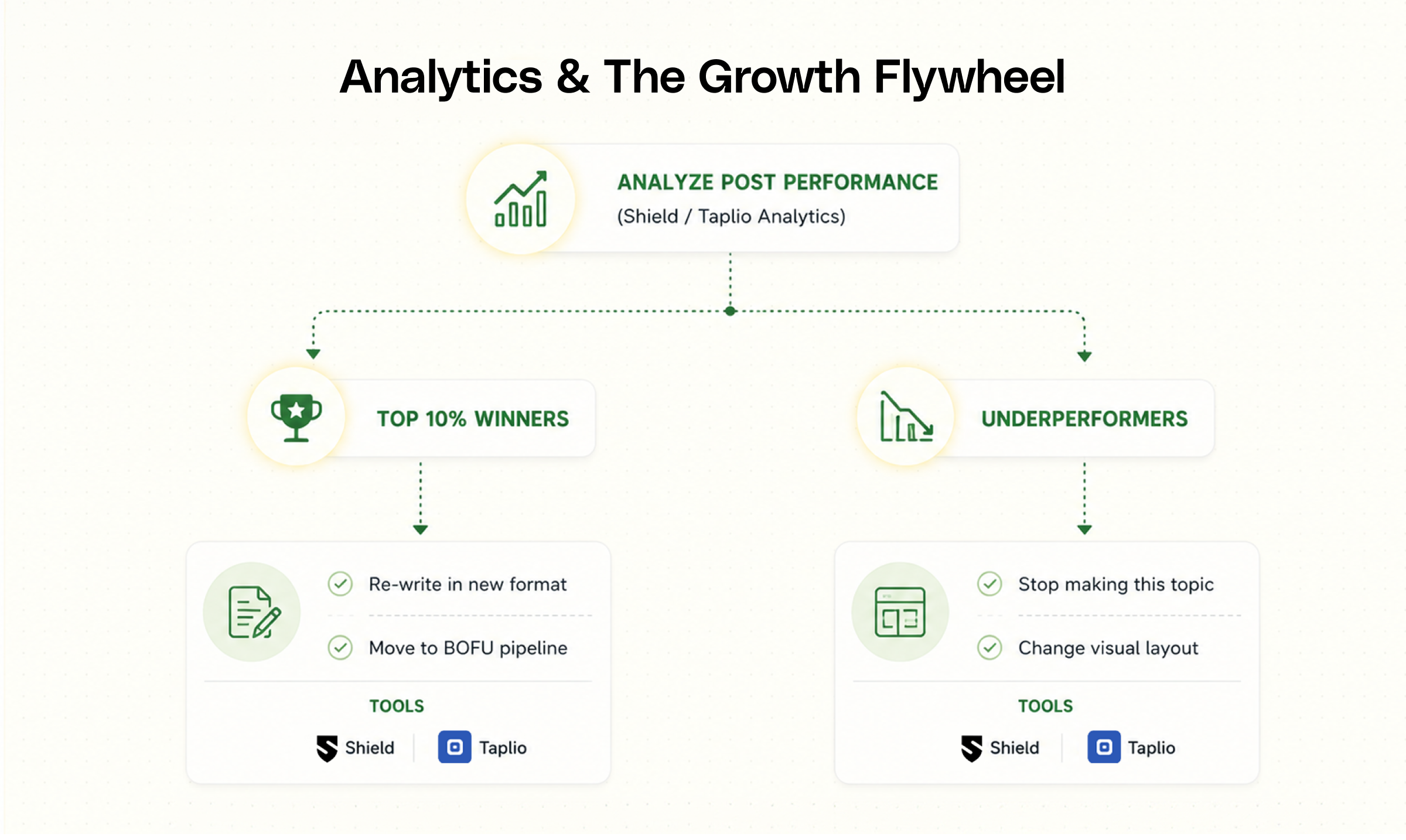
- Collect Metrics (Shield Analytics / Taplio): Review posts every 30 days. Look for:
- High Impressions + Low Engagement: The hook was good, but the content body was boring.
- High Engagement + Profile Clicks: High-intent content that struck a chord with target buyers.
- Double Down on Winners: If a carousel about "B2B Cold Outbound Frameworks" gets 50 profile views and 10 DMs, convert that exact same post into a short video clip next month and re-publish it.
- Kill Underperformers: If text posts about industry news consistently get zero engagement, stop spending time creating them.
Why You Cannot Skip This Step?
Without analytics, you are blind folded. Analytics turns social media marketing into a predictable, data-driven science.
Phase 5: Intent Signal Capture To Sales Pipeline
Likes don't pay the bills. Here’s how to catch the subtle buying signals, like a profile view or a comment, and turn them into real sales meetings automatically.
Step 10: The Signal Conversion Tech Stack
This phase takes public social signals (someone liking or commenting on your post) and automatically turns them into direct sales opportunities.
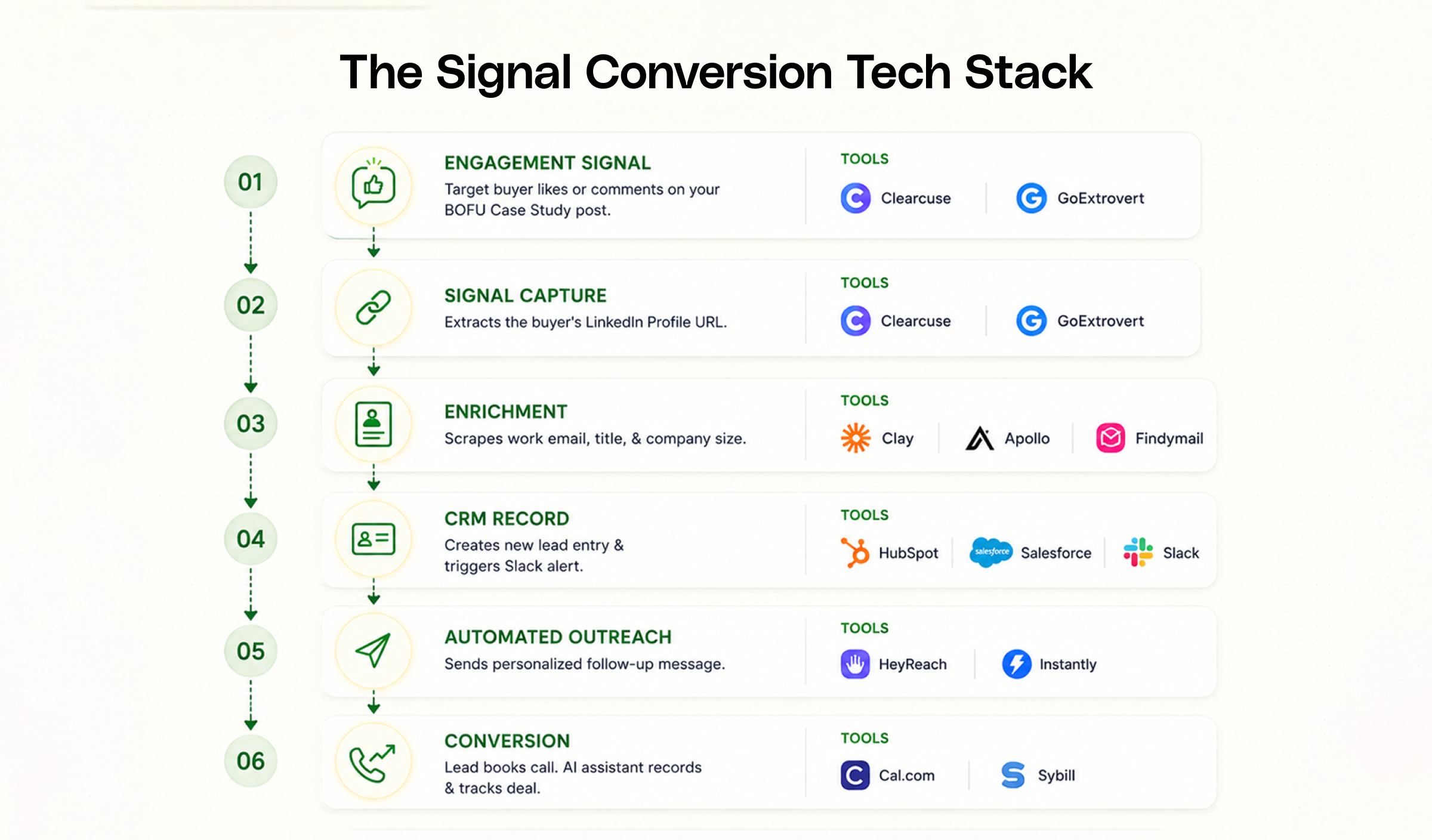
Here's the breakdown of how each tool functions.
.png)
Why This Step Cannot Be Overlooked?
Without this final layer, social media is purely an exercise in acquiring vanity views. This phase systematically extracts high-intent prospects from your audience engagement and puts them directly onto your sales calendar.
Bringing It All Together
Posting on LinkedIn without a distribution system is like driving a supercar with no engine, it looks nice in the driveway, but it’s not taking you anywhere.
By combining sharp ICP positioning, AI-powered market research, a streamlined production line, and automated signal capture, ONEGTMLAM transforms LinkedIn from a casual social platform into your single strongest demand-generation pipeline.
So, let’s build your system together. Building a custom GTM distribution machine requires precision, but you don't have to do it alone.
Whether you need us to build this architecture for your team or guide you through the setup step-by-step, we’re ready to help. Click here to book a call with us.
Let's turn your engagement into revenue.