

Someone views your profile on Monday. Two people from their company like your post on Wednesday. On Friday they post a job for the exact role you sell into. That is a stack, and intent-based LinkedIn outreach means working the stack instead of a title filter you exported in January.
Everyone is selling this right now, mostly because generic outbound stopped clearing single digits. By vendor benchmarks, stacked-signal outreach runs 25 to 40% reply rates against 1 to 5% for generic sends, and that gap is the whole argument for doing this the hard way.
What gets published about it usually names categories and never names a stack. Ours is below, tool by tool. If you're struggling or facing issues, here's how we approach this at ONEGTMLAB.
Category names are easy to publish and easy to forget. Here is the whole thing instead, named tool by tool, nothing hidden behind a label.
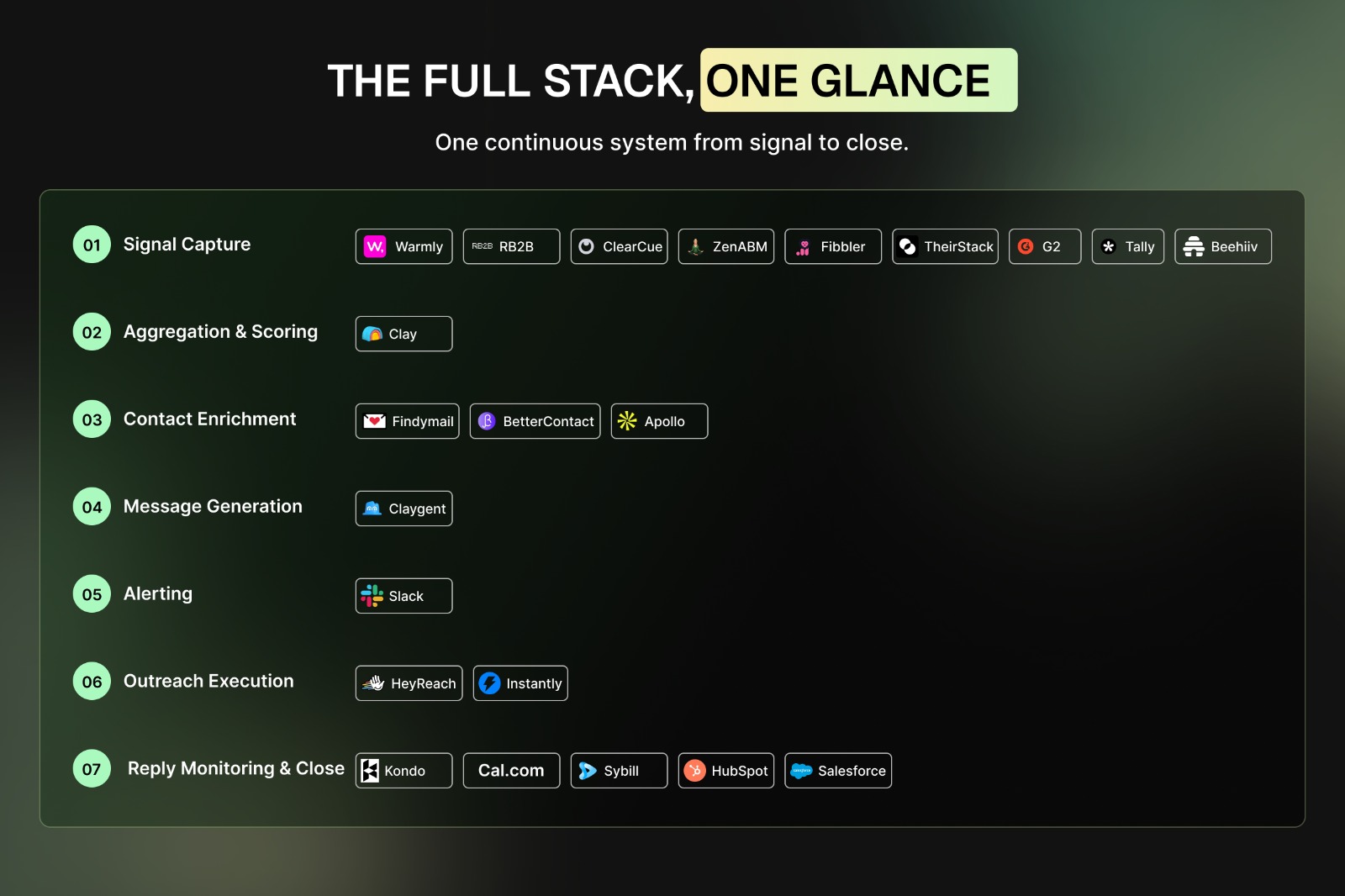
The full stack, in one place
Before the stage-by-stage walkthrough, here is every tool in the system, so you can see the shape of it at a glance. Nothing here is a category placeholder, and nothing here is aspirational. This is what runs.
- Signal capture: Warmly and RB2B (website visitors), ClearCue (profile viewers, post engagers, competitor audience), ZenABM and Fibbler (ad engagement), TheirStack (job postings), G2 (review intent), Tally and Beehiiv (content downloads and newsletter signups)
- Aggregation and scoring: Clay
- Contact enrichment: Findymail, BetterContact, Apollo
- Message generation: Claygent
- Alerting: Slack
- Outreach execution: HeyReach (LinkedIn DM), Instantly (email)
- Reply monitoring and close: Kondo, Cal.com, Sybill, HubSpot, Salesforce
That list is the destination. The reason it works is the sequence, and the sequence starts with a wider net than most teams cast.
Here's the breakdown of the workflow
Eight stages, one system, capture to close.
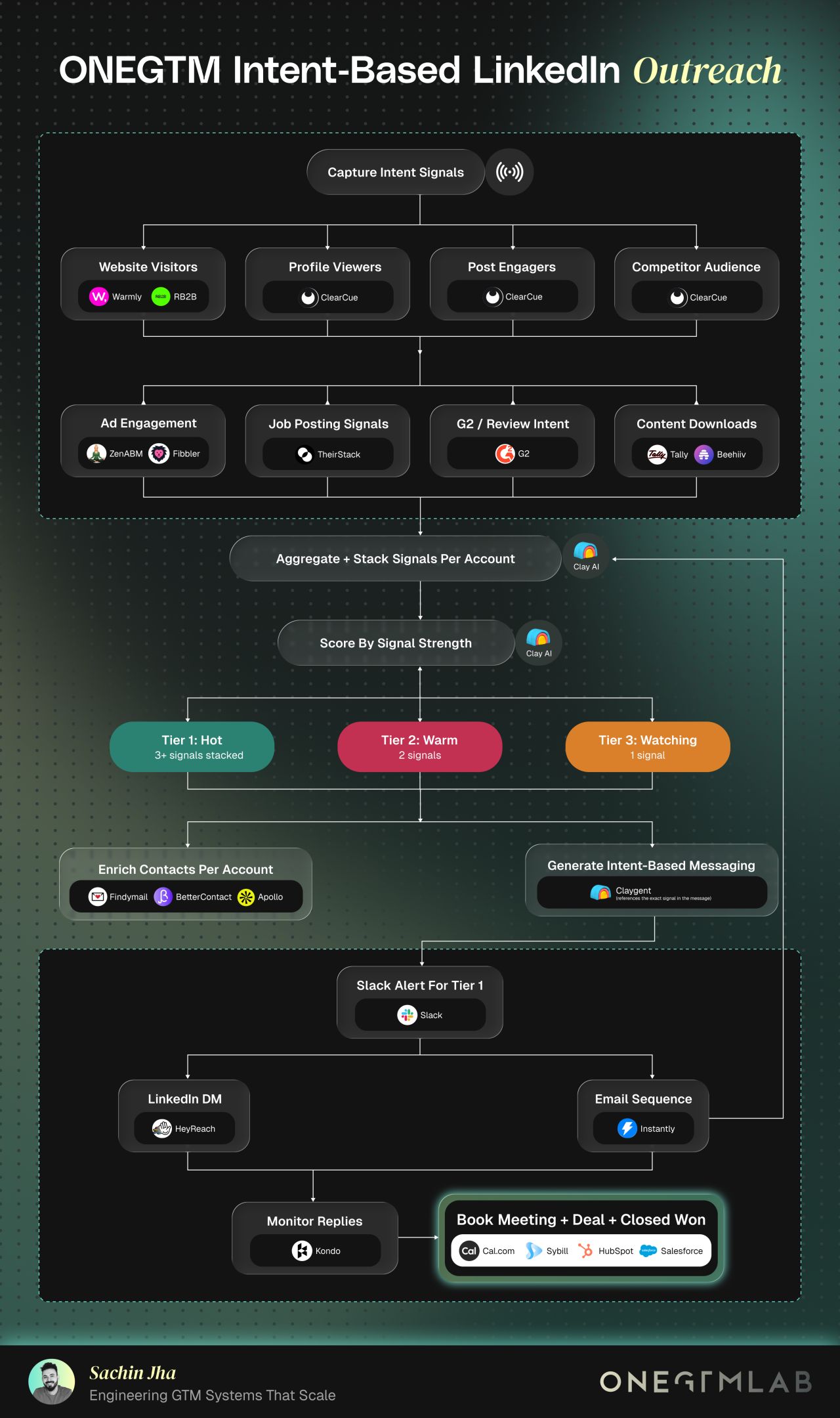
Stage 1: Capture signals from eight places, not one
Teams doing “signal-based outbound” are often really doing one-signal outbound. They plug in a website visitor tool, get a daily list of companies, and message all of them. That is better than nothing, but a single visit is noise until something else corroborates it.
We capture from eight sources in parallel.
How they work together:
1. Warmly and RB2B capture the website side automatically. RB2B resolves person-level identity on US traffic, and Warmly covers account-level intent plus the rest, so nobody has to manually cross-reference an analytics dashboard against a company list.
2. ClearCue covers the three LinkedIn-native sources that matter most. Who viewed the profile, who engaged with a post, and who is engaging with competitor content. That last one is quietly the best of the three, because someone commenting on a competitor's launch post is telling you exactly which problem they are shopping for.
3. ZenABM and Fibbler deanonymize LinkedIn ad engagement at company level. An account that clicked three ads becomes visible rather than buried in a campaign dashboard nobody checks.
4. TheirStack, G2, Tally, and Beehiiv catch the rest. TheirStack watches job postings, which is the most underrated signal in B2B because a hire is a budget decision made public. G2 captures review and category browsing intent, while Tally forms and Beehiiv subscriptions catch the people who raised a hand on your own properties.
The job-posting signal earns its place with evidence. UserGems' research on champion tracking found that job-change and champion signals correlate with 114% higher win rates and 12% shorter deal cycles, a vendor-published figure but one that has held up across independent citations.
Hiring signals work on the same logic in reverse, telling you a team is being built before a vendor is chosen. Eight sources produce a lot of raw activity, though, which is exactly the problem the next stage exists to solve.
Stage 2: Stack the signals per account in Clay
Nine capture tools means nine inboxes, nine exports, and nine versions of the same company name. Left alone, that produces a pile of activity nobody acts on. Clay is where the pile becomes an account view.
How it works:
1. Clay resolves every signal source to a single account record. Every source from Stage One routes into Clay, which matches them to one company regardless of which tool or which name variant the signal came in under.
2. It counts what is attached and produces one clear picture per account, not a list of separate events. The output is not “Acme visited the pricing page.” The output is: Acme visited pricing twice, two people engaged with last week's post, they are hiring a RevOps manager, and someone from there clicked an ad in March.
One row, four signals, one clear reason to reach out.
This aggregation step is the actual product of the system, and it is the step most teams skip. Buying a signal tool is easy, and stacking signals into a single account picture is the work. Once the signals sit together, they can finally be ranked.
Stage 3: Score by signal strength, then tier
Clay scores each account by how many independent signals have stacked and how recently. That score sorts accounts into three tiers, and this is the point where the system stops being data collection and starts being a queue.
- Tier 1, Hot: three or more signals stacked
- Tier 2, Warm: two signals
- Tier 3, Watching: one signal
One quick note on naming, since we use tier language elsewhere on this blog. This LinkedIn-specific tiering is scoped to this motion, distinct from the account-priority and signal-urgency tiers used in our GTM Signal Response System playbook and our 25 B2B Buying Signals post. Same underlying idea, different scope.
The three-signal threshold for Tier 1 is not arbitrary. Instantly's 2026 cold email benchmark report puts the average cold outreach reply rate at 3.43%, with top performers clearing 10%.
Autobound's 2026 cold email guide reports that outreach built on two to three stacked signals lands between 25% and 40% reply rates, against 1% to 5% for generic sends. Both figures are vendor-published research and should be read as such, but the direction is consistent with what we see: the second and third signal are where reply rates change character.
Tier 3 accounts do not get messaged. They sit and accumulate, and if a second signal arrives they promote themselves. For the accounts that do clear the bar, you now need someone specific to talk to.
.jpeg)
Stage 4: Enrich contacts per account
An account-level signal is a company, and you cannot DM a company. This stage turns the account into named people with working contact details, using three tools in a waterfall rather than one.
How they work together:
1. Findymail and BetterContact run first for email discovery. BetterContact itself hits multiple providers to lift match rates on the harder domains, so the waterfall keeps trying before it gives up on a contact.
2. Apollo fills the gaps and supplies the firmographic and role context needed to pick the right person, not just any person. The goal is not a long contact list per account, it is two or three people whose role actually connects to the signal that fired.
Matching the contact to the signal matters more here than volume. If the signal is a RevOps job posting, the buyer is not the CTO. With the right people identified, the system can finally write something worth sending.
Stage 5: Generate messaging that names the signal
This is where most automated outreach falls apart. Teams do beautiful signal work, then send “I noticed you're in the space” to everyone in the queue, which throws away every bit of context they spent money collecting.
How it works:
1. Claygent, Clay's AI research agent, drafts the opening from the specific signal on the account record. It does not draft from a template with the company name swapped in, it drafts from whatever actually triggered the account into the queue.
- If ClearCue caught someone commenting on a competitor's post about migration pain, the message references migration, not “growth.”
- If TheirStack caught a job posting, the message references the hire.
The signal is not just the trigger, it is the content of the first line.
That specificity is what separates a signal system from a faster spray. The message has to prove the timing was earned, and it should read as though a person noticed something rather than a filter matched something. Once the message exists, the only remaining question is how fast a human sees the best accounts.
Stage 6: Alert Tier 1 in Slack
Tier 1 accounts fire a Slack alert with the account, the stacked signals, the enriched contacts, and the drafted message attached. Nobody has to open a dashboard to find out that four signals landed on a target account this morning.
This is a deliberately small step that changes behavior more than it looks like it should. A hot account that sits unworked for three days is functionally a cold account, because the signal decays. Alerting only Tier 1 keeps the channel meaningful, since an alert channel everyone mutes is worse than no alert channel. From the alert, the account splits into one of two channels.
Stage 7: Run the channel, LinkedIn or email
How they work together:
1. HeyReach handles LinkedIn DMs. It exists in this stack because it manages sending across multiple sender profiles without wrecking account health. ClearCue pushes signal-qualified lists into HeyReach directly, so the person who engaged on Monday can be in a sequence on Tuesday with the engagement referenced in the message.
2. Instantly runs the email side. It handles accounts where LinkedIn is not the right surface or where a second channel is warranted.
The LinkedIn channel carries most of the weight for us. I have written publicly that we manage 27+ founder profiles and that roughly 90% of our leads come inbound through LinkedIn, which is also why the profile viewer and post engager signals sit so high in our own capture layer. The system described here is the one we run on ourselves before we run it for anyone else.
One detail in the diagram is easy to miss: the email sequence loops back into Clay. Sends, opens, replies, and non-replies return to the account record as fresh signals, which means engagement with your outreach is itself an intent signal that can promote an account a tier. The loop is what stops this being a one-shot campaign. What comes back through it still needs handling.
.jpeg)
Stage eight: monitor replies, then close
How they work together:
1. Kondo sits on top of the LinkedIn inbox and makes replies manageable. Labels, split inboxes, snoozing, and CRM sync. It does not send anything automatically, which is the point: the sending is automated, the replying stays human. At the volume this system produces, an unmanaged LinkedIn inbox is where good conversations go to die.
2. Cal.com books the meeting. A positive reply routes straight to a booking link instead of a back-and-forth.
3. Sybill captures and summarizes the call. The context from the original signal does not get lost between the DM and the deal.
4. HubSpot or Salesforce carries the deal from there. Nothing exotic at this end of the workflow, because by this point the hard part is already done.
That is the full system, capture through close. Before you go build it, there are two honest limits worth stating.
What this workflow does not fix
A score is a prioritization tool, not a prediction. I have written about an account we scored at 91 that booked a meeting off the strength of that score and went precisely nowhere. Signal stacking tells you who is worth a message today, and it tells you nothing about whether they have budget, authority, or a real problem.
The second limit is the stack itself. I have also written about $30,247 a month across 22 tools with zero pipeline coverage, and the diagnosis there was not the tools.
A signal stack with no owner, no threshold, and no follow-up discipline is an expensive way to generate a dashboard. If you are weighing what to actually pay for, our breakdown of legacy GTM tools versus AI-native tools versus Claude covers the cost side in more detail.
.jpeg)
Build the sequence first and the stack second, and most of the tooling questions answer themselves. A few of those questions come up often enough to be worth answering directly.
Quick note: This workflow is one channel-level slice of a broader system. I mapped the wider version, 8 stages and 30+ tools in one sequence, and this piece zooms into the LinkedIn motion inside it. If you want the signal library rather than the workflow, start with our 25 B2B buying signals post.
If you are building this and something is breaking, that is usually a sequencing problem rather than a tooling problem, and it is the sort of thing we untangle with teams every week. Tell us where it is stuck and we will tell you what we would change.
If you want this workflow built for you instead of by you, let's connect.

.jpeg)